Case Study · Product Design · CrossFit Games
CrossFit Games Custom Leaderboard
An online leaderboard experience that lets athletes create and customize their own leaderboards to track friends, favorites, and self-identifying hashtags — all while staying true to the core CrossFit Games experience.
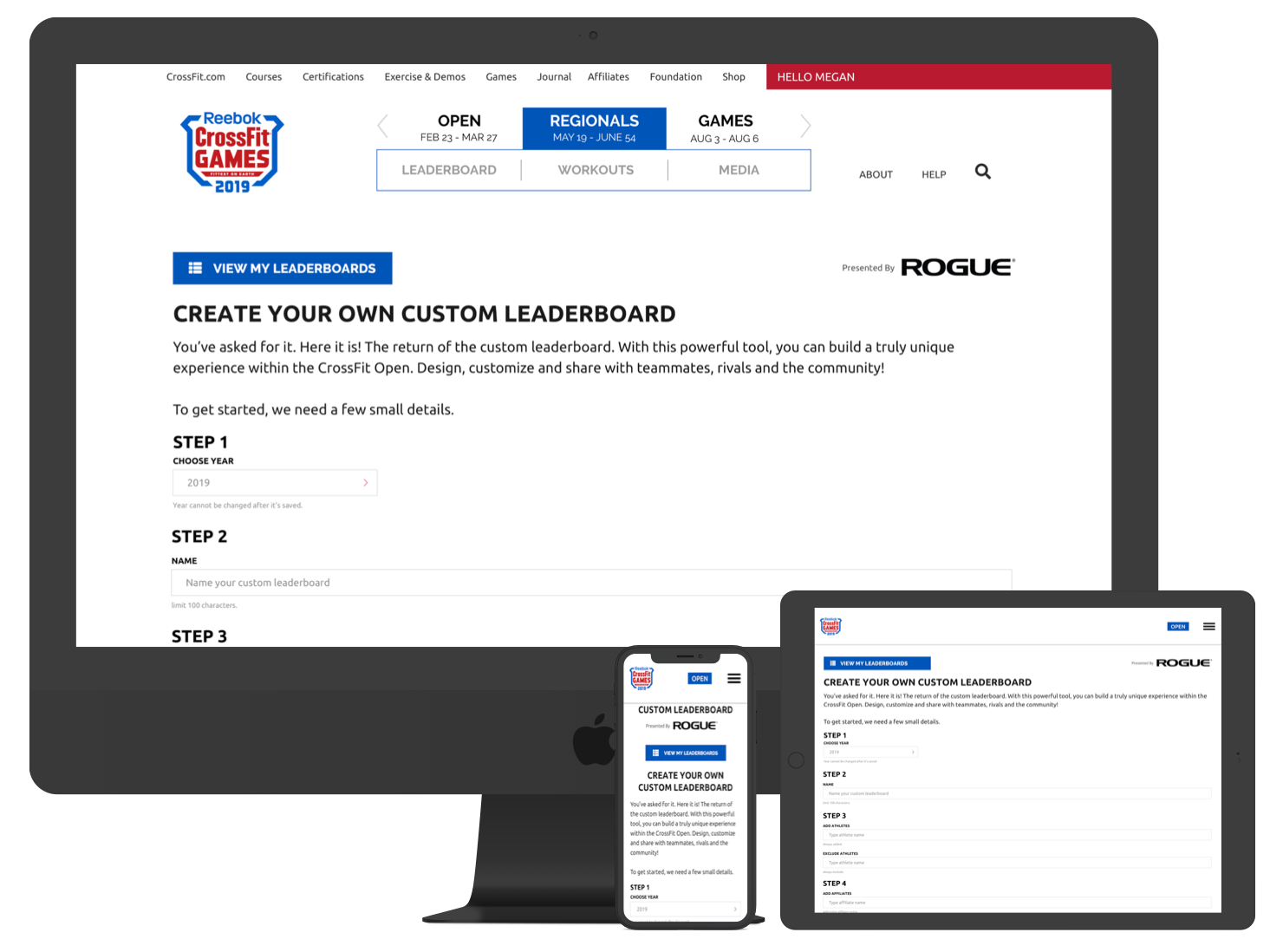
Custom leaderboards built on top of the CrossFit Open leaderboard, surfaced across devices.
Overview
The CrossFit Games are a global fitness phenomenon. Beginning with the CrossFit Open, athletes across the world compete in weekly workouts, judged at their affiliate or via video, with the top competitors earning invites to the CrossFit Games.
The Open leaderboard is the primary tool for comparing nearly half a million athletes over five weeks. In 2019, the goal was to bring back the Custom Leaderboard — a feature that allowed athletes to create personal leaderboards to track friends, fan-favorites, and self-identifying hashtags, and to share those views socially.
Role & Impact
Lead UX / UI Designer
Led UX and UI for the Custom Leaderboard relaunch — from requirements gathering and flow design to high-fidelity prototypes that aligned with CrossFit Games branding and the existing Open leaderboard.
Product Context
Layered on a Live System
Custom leaderboards had to sit on top of the existing Open leaderboard logic and infrastructure, respecting performance constraints and entrenched usage patterns.
Scale & Constraints
Massive Usage, Finite Resources
My Role: Lead UX / UI for a High-Stakes Feature
As lead UX/UI designer, I worked with stakeholders and PMs to define requirements, researched previous iterations, and designed flows and interfaces that honored CrossFit Games branding and the established Open leaderboard behavior.
Discovery
Definition
Design
Build
Launch
Problem & Goals
The primary challenge was designing a creation flow that felt powerful yet approachable for a wide range of athletes. We needed to answer:
- Should the experience be a step-by-step wizard or a single-page builder?
- How much “hand-holding” did users need vs. direct control?
- How would this translate to mobile web and the CrossFit Games app?
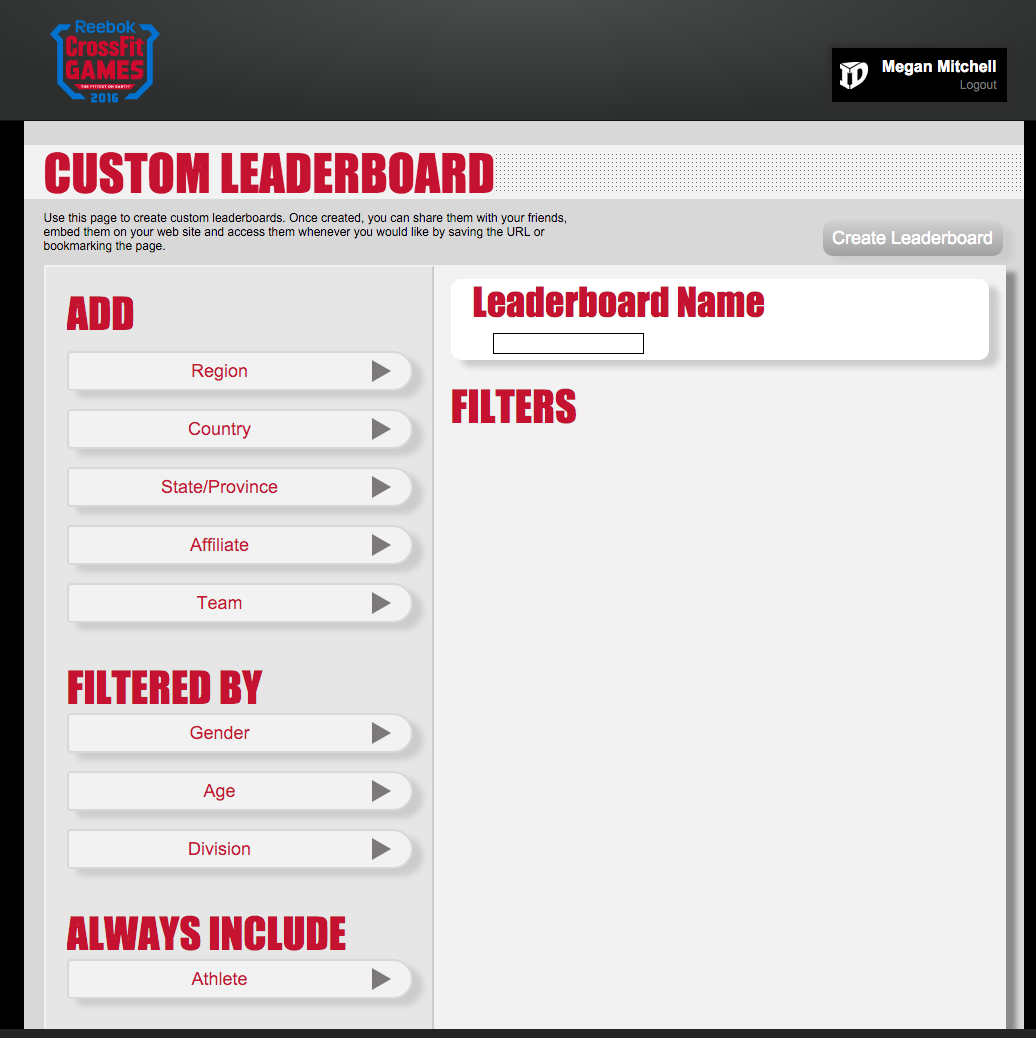
The 2016 CrossFit Open Custom Leaderboard. The 2019 relaunch needed to build on this foundation while improving usability and scalability.
Research & Flow Planning
As a project team, we started by sketching potential flows and revisiting how previous custom leaderboard iterations had performed. We explored both multi-step wizard flows and an all-in-one approach.
We decided on a unified “all-in-one” creator — keeping the athlete on a single page to avoid disorientation and reduce friction, especially under competition stress.
At the same time, we needed to respect backend constraints. The leaderboard itself is built around filters that query a massive athlete pool. We initially considered building the leaderboard live, updating with each input, but engineering flagged the performance risk of sending a request on every change at Open-scale traffic.
The team aligned on a Build → Preview → Save model: athletes configure filters first, then preview a generated leaderboard, and finally save it once they’re satisfied. This struck the right balance between responsiveness and system stability.
Prototyping & Testing
I began with wireframes and then moved into high-fidelity flows, leveraging our existing design system assets to accelerate exploration and maintain consistency with the broader Games experience.
We explored multiple layout patterns for the step-by-step creation process, focusing on how to explain what each filter did. Concepts included:
- Guided descriptions on the creator screen for each step
- Education on the splash/entry page
- Short sub-descriptors under each filter label
Testing with a small group of athletes showed that a hybrid approach — using a structured splash page plus concise sub-descriptors — provided clarity without overwhelming the interface.
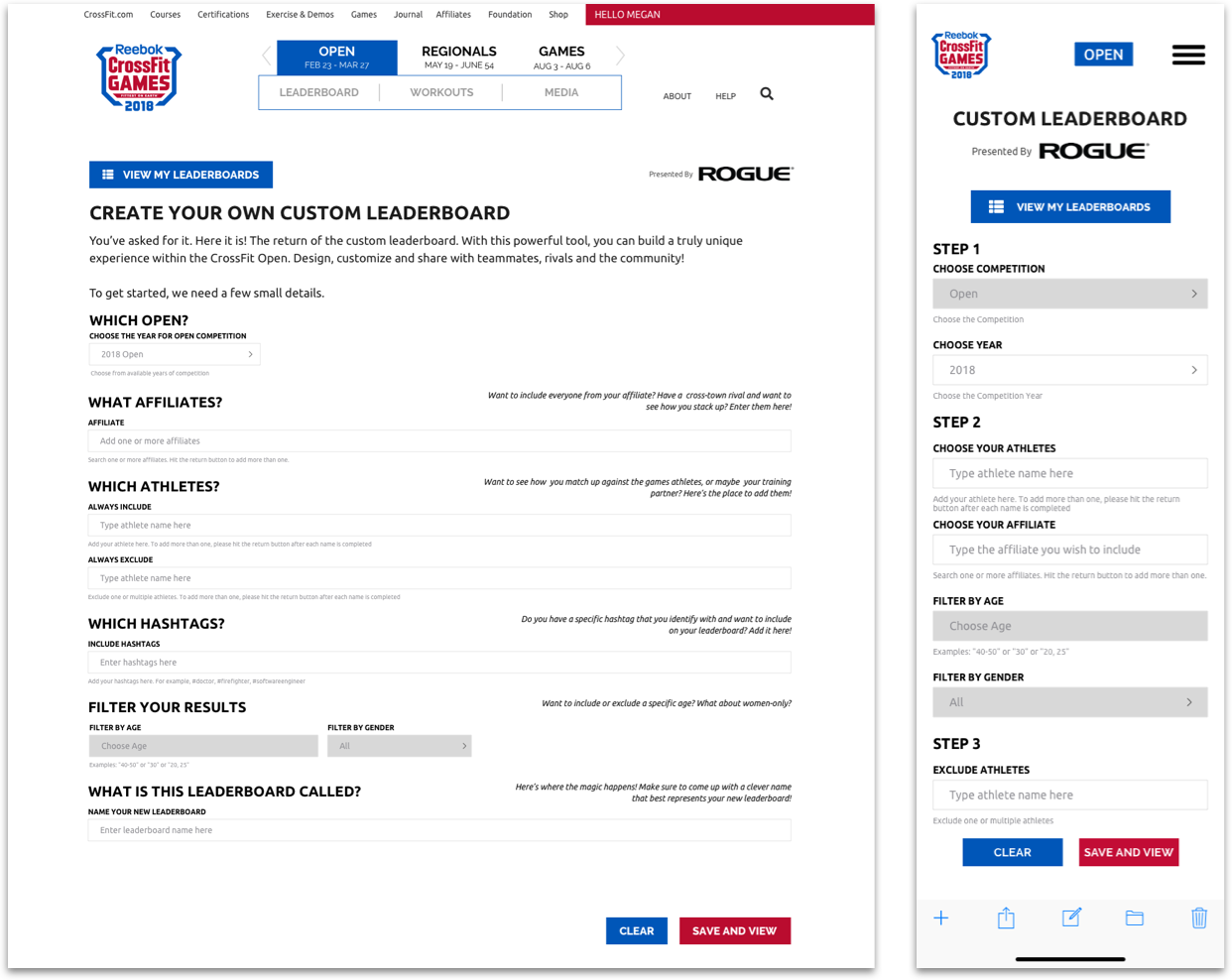
Early layout exploration featuring step-by-step input descriptors.
Because we adopted the Build → Preview → Save pattern, we also needed a clear way to show athletes what they had already selected before applying filters.
Early builds lacked this visibility, which caused confusion. We explored:
- Success messages after each input
- A running tracker in a side column
- Status indicators near the primary actions
The final solution used “chips” to summarize filter selections. As athletes configured their leaderboard, chips appeared at the bottom of the screen, each removable in one click — a pattern that translated well to mobile.
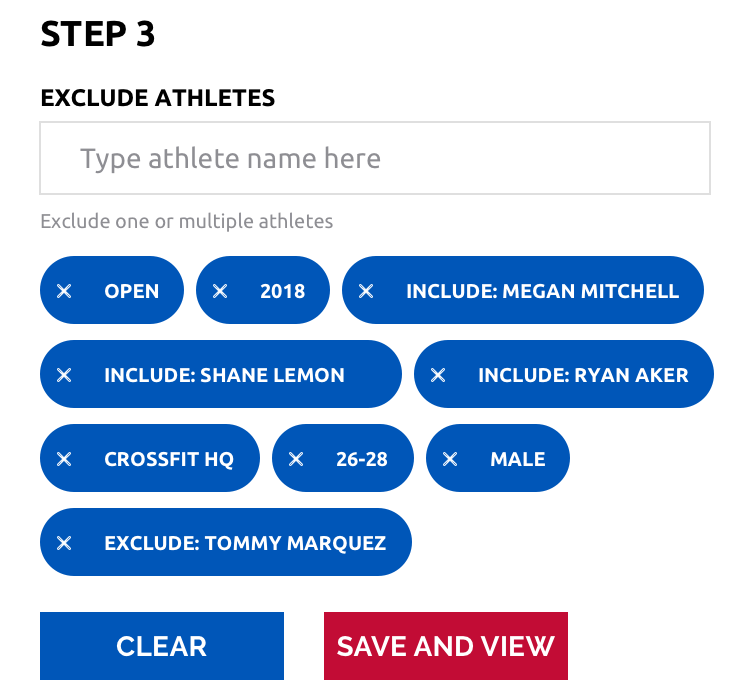
Filter “chips” displaying the athlete’s inputs on mobile, with options to remove or clear.
Managing Multiple Custom Leaderboards
A final requirement was a central place to manage all custom leaderboards an athlete had created — including editing, deleting, and sharing them.
On desktop, this naturally led to a simple table that surfaced:
- Leaderboard name
- Competition
- Edit / Delete actions
- Social sharing
Mobile presented more of a challenge. With up to seven columns and potentially long leaderboard names, a naïve table layout would quickly break. We simplified the design to use a compact layout with a “click to reveal” action, sliding out additional details while preserving scannability.
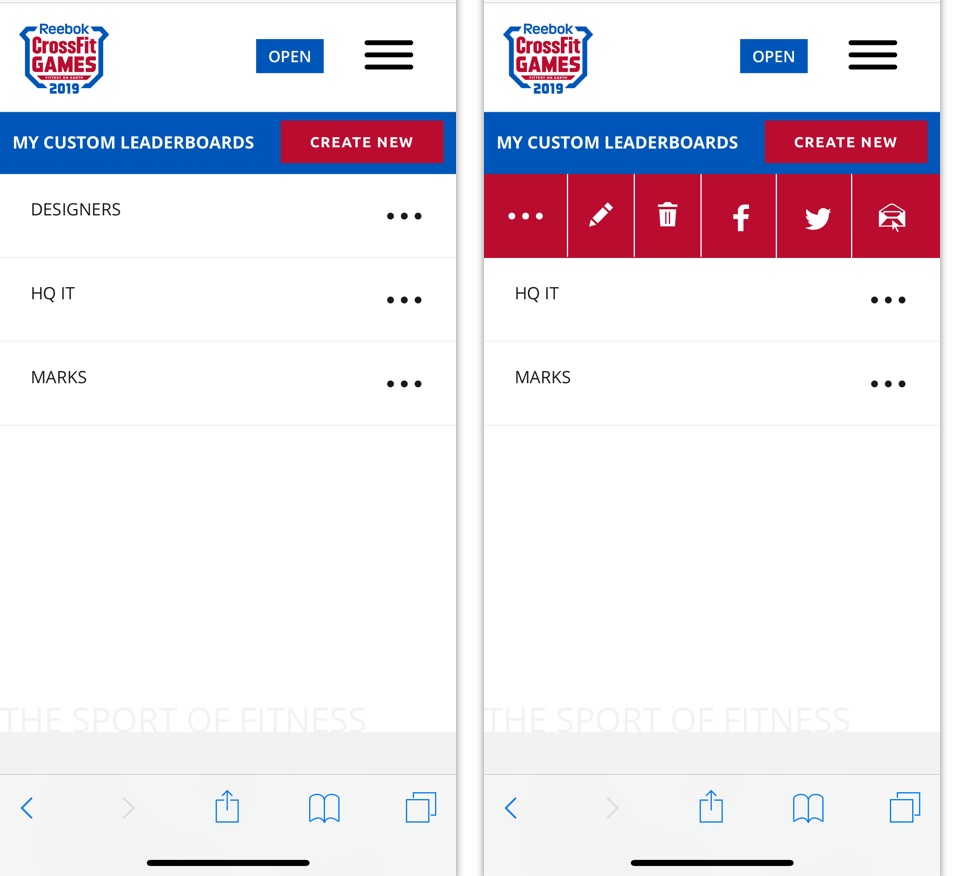
Mobile solution for limited space: a “click to reveal” action that exposes additional leaderboard details.
Scenario Builds & Edge Cases
To make sure the feature behaved reliably in the wild, I built out scenario-based prototypes that covered:
- Creating hundreds of custom leaderboards
- Filters returning more athletes than the system could support
- Empty or overly narrow filter combinations
- Behavior across desktop, tablet, mobile web, and the CrossFit Games app (iOS & Android)
These flows became critical artifacts for developers and QA, helping the team validate that the implementation matched the intended behavior under real-world conditions.
Outcome & Launch
The CrossFit Open Custom Leaderboard launched in January 2019, a month before the Open began. It quickly became one of the most requested and celebrated features, backed by launch videos and quick how-to guides.
Athletes could:
- Create highly personalized leaderboards
- Track friends, favorite athletes, and hashtag-based groups
- Share those views socially to drive engagement during the Open
You can view and create your own custom leaderboard at games.crossfit.com .
Conclusion
The Custom Leaderboard relaunch shows how thoughtful UX and careful attention to system constraints can unlock meaningful personalization at scale. By grounding the experience in real athlete behavior, respecting backend limits, and designing for multiple surfaces, we delivered a feature that deepened engagement throughout the CrossFit Open.
My role spanned end-to-end design: requirements gathering, flow definition, interface design, prototyping, scenario builds, and close collaboration with engineering and QA. The result was a feature that fit seamlessly into the existing ecosystem while giving athletes powerful new ways to experience the competition.